

The inside scoop on a Discover custom publication
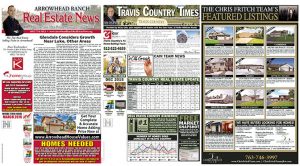 We often get asked, “what exactly goes inside my custom publication?”
This post is designed to answer this question in more detail than you might see on the website, but keep in mind our friendly Discover-ers are just a phone call away to dive as deep into the details as you wish. Check out our video above and read on to find out more.
The goal of a Discover custom pub is to drive leads to your desk.
It is designed to brand you as an expert and help you build loyalty in the community. For many of our clients, it serves as the backbone of their direct mail marketing and also integrates seamlessly with their web, email, and social marketing.
We have designed the product and process to be unbelievably simple.
We thoughtfully select and produce all the content with your image and your reader’s interest in mind (including custom-written articles just for you). In addition to providing, designing, and placing all of the content, we take care of the mailing lists, printing, sorting, labeling, and mailing.
Here’s what we put in to your paper each month:
- Two full custom-written articles
- Call for Listings below the front page article, aka “Buyers Box”
- Your local market stats
- “Ask the Agent” article in your name
- Your “featured listing” spread custom designed
- Your choice between a puzzle page or coloring contest
- Wolgang Puck recipe
- One article each on fitness, travel, and lifestyle
- 3-4 real estate related articles
- 5 custom designed calls to action (featuring you, your photo, your websites, etc)
What do you need to provide?
After we get your first issue done, all we need are updated listings and your choice of coloring contest or puzzles. Sometimes, we need you to pull sold stats if we can’t get the data ourselves. Once we complete the paper, you simply review and approve and within days it is mailed out to thousands of happy home-sellers. A Discover publication is a custom 12-page direct mail powerhouse and the beauty of it is that it is so, so simple to publish.
We hope you find this information helpful. Please visit “How it Works” and let us know if you would like to further explore the benefits of a Discover custom publication.
Designing and Writing for Today’s Technology
From the Right Side of Your Brain
“asdf jkl;,” The refrain from typing teachers everywhere in the ‘80s, mixed with the clack of electric typewriters banging away, and the DING as you reached the end of the carriage return, are familiar sounds to most Gen Xers (and older. Millennials, you are excused from the rest of this post). “Remember to double-space after sentences…”
STOP! Here’s where the problem begins. Let me explain…
 Computers are NOT typewriters. Modern fonts and computer programs automatically compensate for a slightly larger space after sentences. So in this modern environment it is never necessary to double space after sentences. (Certain technical publications and documents aside). In fact, every time I receive a document with two spaces after sentences, the first thing I do is to remove them. Then starts the process of removing all the quirky workarounds that went with Typing, replaced nowadays with Keyboarding.
Your Qwerty layout of individual keys on the keyboard in front of you may be reminiscent of your old Smith Corona, but dig a little deeper and you will see the differences. Here are some of the main offenders…
- — The double dash. NO, just no. M dashes, and N dashes too, as they are known —, Can be created with ease on a computer.
- Hello Underlining. Don’t do this either. Typewriters used underlining for emphasis. Why? Because, typewriters have one font, in one size. So the choices we have for emphasis now didn’t exist then. When tempted to underline a word or phrase, try italics, bold, character size, or a different font altogether. ALL CAPs for emphasis is also a no-no. (stop yelling already!)
- “ ” Quotation marks and apostrophes. Real quotation marks are curved. If you end up with lines that are straight up and down, those are inch marks.

These are but a few of the myriad topics discussed in the book “The Mac is not a typewriter,” by Robin Williams. Robin Williams is a well-respected design and writing teacher and has many books on computer related topics. Don’t fret PC users, “The PC is not a typewriter” is also available.
 The main difference between the mac and PC being that a few of the keystrokes are needed to create the punctuation you are looking for. This is a wonderful reference guide for anyone who learned the “old ways” and seeks to harness a little of the powerful upgrades computers provide to make their writing pop.
There are also numerous pieces written online regarding these topics. I urge you to check them out. Some will even argue for using two spaces. Stay strong, hold your ground, and for goodness sake, don’t fall victim to these holdouts.